
Welcome to the 206th edition of the Windows 365 Community newsletter! This week, we bring you the latest Windows 365 news, free events, and expert tips & tricks from the world of Cloud PC.
Effective Workload Analysis for Cloud Endpoint Deployments
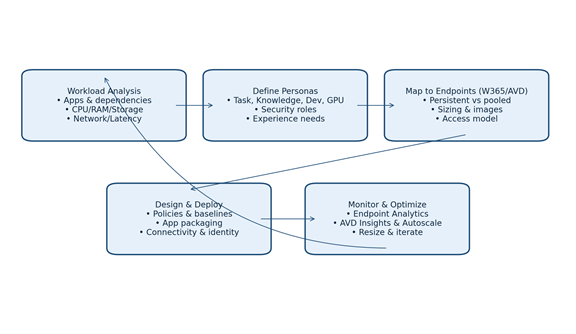
Chinwike Onyia has written an article providing examples on how to analyze user workloads for cloud desktops and how to map personas to cloud desktops living in Windows 365 or Azure Virtual Desktop. Once configured, make sure to monitor your environment and use cost optimization to reduce overall running costs.
Read the full post here: Chinwike Onyia – Effective workloads analysis for Cloud Endpoint deployments
Simplifying the creation of Windows 365 provisioning policies part 1

Thomas Marcussen has published an article on Windows 365 provisioning policies. He covers the significance of provisioning policies, licenses, policy creation, join types and elaborates on Azure Network Connections (ANC).
Provisioning policies are the elements necessary for creating and assigning Cloud PCs to their users. They will determine which operating system version to use, as well as join type, language, and region.
By using critical provisioning rules and settings, these policies will facilitate the building and configuring of Cloud PCs before availing them to end users. Once you create and assign a provisioning policy to the Microsoft Entra user security groups or Microsoft 365 Groups, the Windows 365 service will verify licensing and configure the Cloud PC.
Read the full post here: Thomas Marcussen – Simplifying the creation of Windows 365 provisioning policies part 1
First looks at Frontline Shared UES
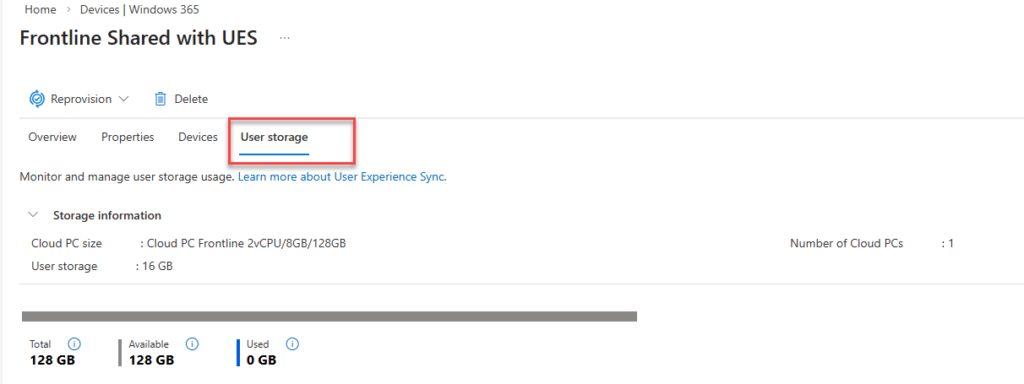
The duo of Paul Winstanley and Niall Brady released an article about a feature for Frontline Cloud PCs in shared mode, called User Experience Sync or UES in short. UES is a cloud-native profile management solution designed to give users a seamless, consistent and personalized Windows experience across Windows 365 Frontline Shared Cloud PCs and Cloud Apps.
Instead of relying on traditional profile‑management tools, UES automatically preserves the settings every time the user signs in. Microsoft manages the UES infrastructure, vastly decreasing the implementation complexity and cost compared to other profile based solutions.
Paul Winstanley – Niall Brady – First looks at Frontline Shared UES
Windows 365 for beginners: Deploying your first Cloud PC with Microsoft Intune
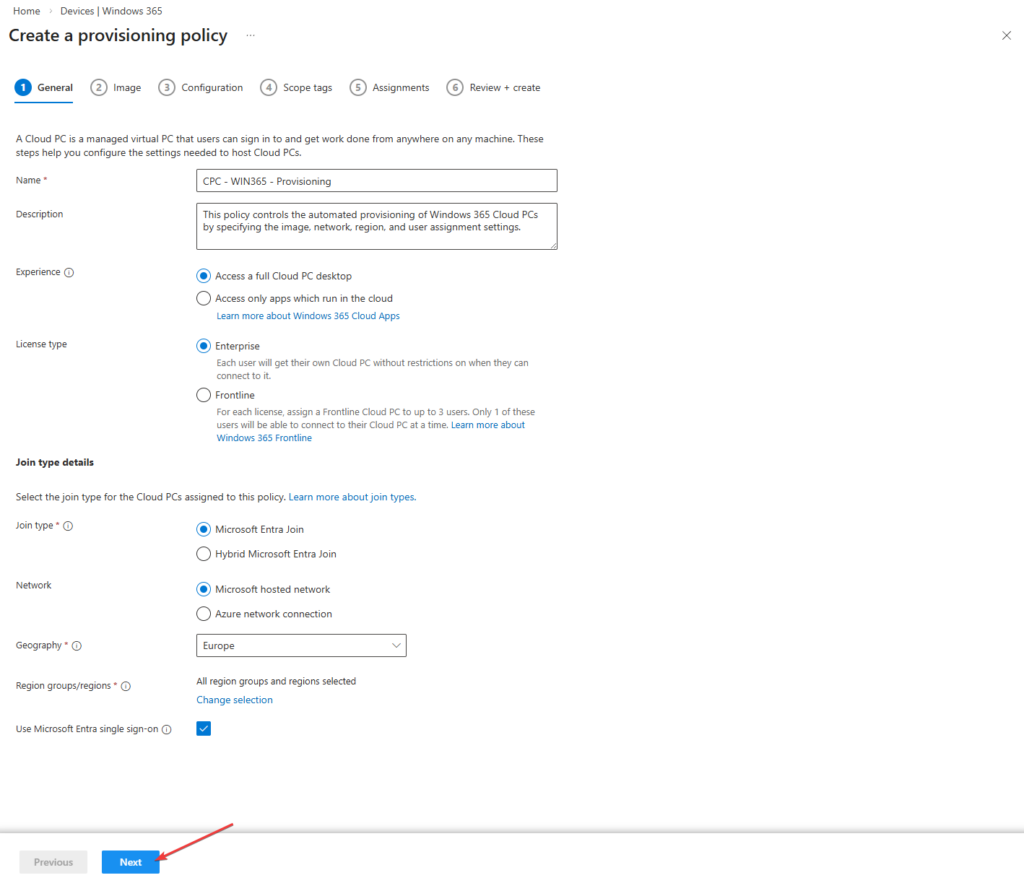
Nicky De Westelinck has released a great article about Windows 365 editions, licenses and demonstrates how to deploy Windows 365 Cloud PCs in a beginner friendly fashion. If you are new to Windows 365, this is a great blog to begin with!
In this beginner-friendly post, we’ll walk through the essentials of getting started with Windows 365. We’ll begin with a brief overview of what Windows 365 is, compare the Business and Enterprise editions, and outline the key requirements to start your deployment journey. Finally, we’ll dive into a hands-on demo showing how to configure and provision your first Cloud PC using Microsoft Intune.
Nicky De Westelinck – Windows 365 for beginners: Deploying your first Cloud PC with Microsoft Intune
Explore the Windows 365 Cloud PC overview reports in Intune
Vaishnav has published an article on Windows 365 Cloud PC overview reports on the HTMD platform. These reports provide a centralized way for admins to monitor health, performance and usage of Cloud PCs. Each report offers drill-through views, customizable columns to make your life as a Windows 365 admin more easy.
Read the full post here: Vaishnav – Explore the Windows 365 Cloud PC overview reports in Intune
What’s new: Week of February 2, 2026
Centralized RDP Shortpath configuration for Cloud PCs is now generally available
Admins can now manage RDP Shortpath modes—Managed, Public/STUN, and Public/TURN—using Microsoft Intune or Group Policy, enabling predictable and policy-driven behavior across Cloud PCs. Registry based policies remove the need for manual host configuration and ensure consistent Shortpath setup.
Migration API now generally available
The Windows 365 migration API has moved out of preview and into generally availability. This enables partners and customers to develop tailored solutions that streamline the transition to Windows 365. By leveraging automation with the Microsoft Graph API and integrating with Microsoft Intune, it allows users to move to Windows 365 more efficiently. This Migration API marks a major step forward in simplifying the migration of persistent VMs from Azure to Windows 365, minimizing both complexity and downtime.
That’s all for this week’s roundup! We love seeing how this community keeps pushing the boundaries of what’s possible with Windows 365. Jump into the forums, share your latest learnings, and let’s keep the momentum going!
See you next Friday!