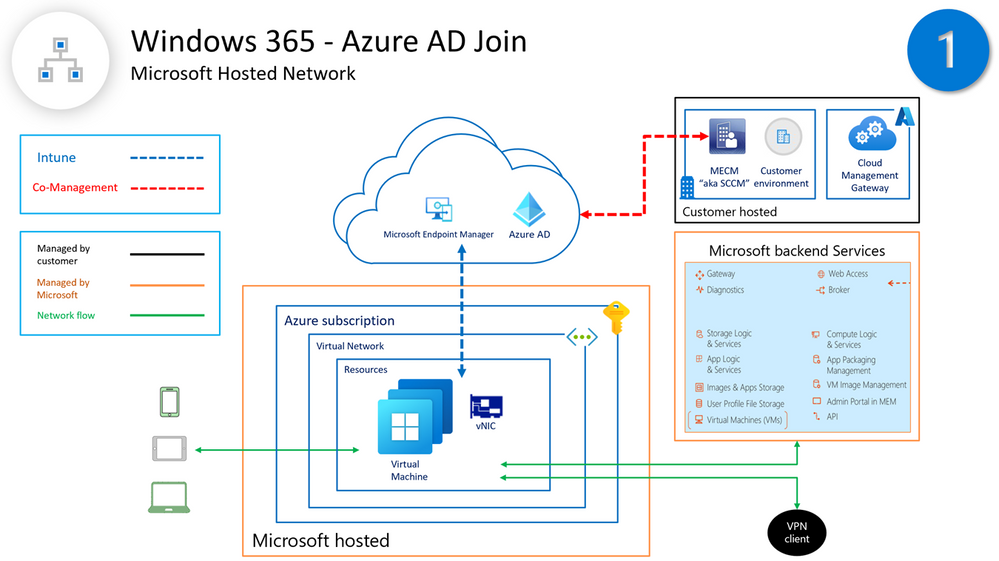
The purpose of this document is to address Windows 365 Cloud PC device management design options (Intune & Co-Management) based on hosting provisioning scenarios, a high-level overview for each solution and deployment considerations giving our HLS customers a wider insight of information to make them successful on their journey building a Windows 365 foundation.
You May Also Like
Weekly Newsletter – 3rd of January to 9th of January 2026
Welcome to the two-hundred-second (202nd) edition of the Windows 365 Community newsletter!…
- Dominiek Verham
- January 9, 2026
Use Microsoft Endpoint Manager filters to target apps and policies to specific devices
IT administrators can now use filters in Microsoft Endpoint Manager to target apps, policies and other workload types to specific devices. Available in public preview with the May release of Microsoft Intune, the filters feature gives IT admins more flexibility and helps them protect data within applications, simplify app deployments, and speed up software updates.
- Community resource
- May 12, 2021
Weekly Newsletter – 30th of August to 5th of September 2025
Welcome to the one-hundred-ninetieth (190th) edition of the Windows 365 Community newsletter!…
- Thomas Marcussen
- September 6, 2025
Weekly Newsletter – 6th of September to 19th of September 2025
Welcome to the one-hundred-ninety-first (191st) edition of the Windows 365 Community newsletter!…
- Sune Thomsen
- September 19, 2025
Weekly Newsletter – 10th to 14th January 2022
Welcome to the Twenty-second (23rd) Windows 365 Community newsletter! We highlight weekly…
- Donna Ryan
- January 14, 2022
Windows 365 User Groups Announcement
We here at W365community are thrilled to announce we have created brand…
- Morten Pedholt Pedersen
- March 31, 2022