
Welcome to the 225th edition of the Windows 365 Community newsletter! This week, we bring you the latest Windows 365 news, free events, and expert tips & tricks from the world of Cloud PC.
Easily managing Windows App on Windows devices
In this article, Peter van der Woude explains how IT administrators can centrally manage the Windows App on managed Windows devices by using a small set of ADMX‑backed configuration settings. He outlines the five available policy settings – covering update behavior, first‑run experience, automatic logoff, desktop shortcut creation, and the admin release ring – and shows how these can be configured through the Intune Settings Catalog.
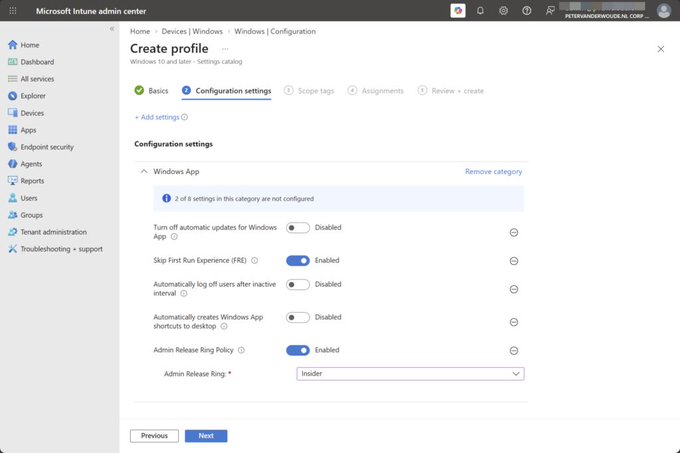
Visit: Easily managing Windows App on Windows devices
Windows 365 Local Admin – Cloud PC Configurations vs User Settings + PowerShell (Graph REST API)
In this article, Aresh Sarkari breaks down why Windows 365 is moving local admin management from legacy User settings to the newer Cloud PC configurations model. He highlights the key differences – policy ranking, conflict handling, and the meaning of Enabled, Disabled, and Not configured – and explains why Cloud PC configurations are now the recommended approach. Aresh also shows what Intune actually sends to Microsoft Graph when creating a Cloud PC configuration and provides a PowerShell script that inventories existing policies, creates the new configuration, and validates it via Graph.
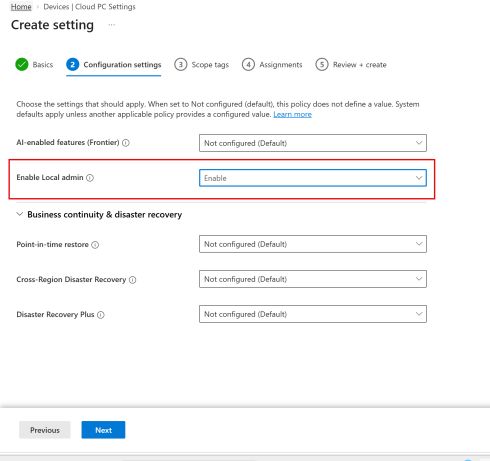
Visit: Windows 365 Local Admin – Cloud PC Configurations vs User Settings + PowerShell (Graph REST API)
Set Default Display Settings for Windows 365 Cloud PCs using Intune
In this article, Vaishnav K explains how Intune now lets administrators set default display settings for Windows 365 Cloud PCs, choosing either a single display or all available displays to ensure a consistent connection experience across the organization. He walks through creating the Remote Connection Experience policy in Intune – naming it, configuring default display settings, assigning it to device or user groups, and deploying it.
Visit: Set Default Display Settings for Windows 365 Cloud PCs using Intune