

Welcome to the 220th edition of the Windows 365 Community newsletter! This week, we bring you the latest Windows 365 news, free events, and expert tips & tricks from the world of Cloud PC.
Windows 365 for Agents: A secured execution environment for AI agents
In this article, Aarthi Sukumar explains how Windows 365 for Agents delivers a secured, fully managed Cloud PC environment built specifically for enterprise AI agents. It introduces distinct agent identities to reduce crossover risks, enforces Zero Trust access through Entra and Intune compliance, isolates agent-only Cloud PCs to prevent privilege escalation, and adds identity‑aware network protection via Global Secure Access. The article also highlights deep governance and visibility through Agent 365, Defender, and Purview, positioning Windows 365 for Agents as a unified, enterprise‑ready platform for running agentic workloads securely at scale.
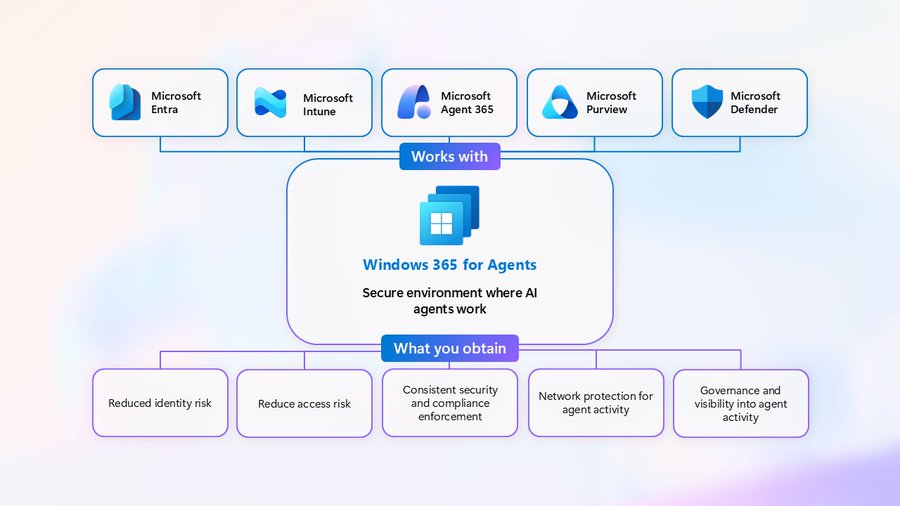
Visit: Windows 365 for Agents: A secured execution environment for AI agents
Windows 365 Wednesdays – Understanding Cloud PC Settings
In this article, Jeroen Burgerhout explains the key management actions available for Windows 365 Cloud PCs once they are provisioned. He highlights how administrators can restart Cloud PCs to resolve update or application issues, restore them to earlier points in time to quickly fix software or configuration problems without rebuilding the device, and resize Cloud PCs when user workloads change. Jeroen also covers where to find essential device information for troubleshooting and shares best practices such as standardizing Cloud PC configurations, using restore before reprovisioning, and validating performance needs before upgrading hardware.

Visit: Windows 365 Wednesdays – Understanding Cloud PC Settings
Target agent identities in Conditional Access policies
In this article, Microsoft explains how to build Conditional Access policies tailored for AI agent identities in Microsoft Entra ID. It covers how to target specific agents or agent user accounts, choose which resources they can access, and apply conditions such as agent risk, device compliance, or execution environment. It also outlines the access controls available for agents, noting that autonomous agents can only be blocked while agent user accounts can be granted access based on compliance or network requirements.
Visit: Target agent identities in Conditional Access policies
First looks at Windows 365’s gallery Image with Developer Configuration (preview)
In this article, Niall C. Brady shares his first impressions of the new Windows 365 gallery image with Developer Configuration. He explains that the image provides a fully preconfigured developer environment across both Windows and WSL Ubuntu, helping teams reduce onboarding time and ensure consistency. After reprovisioning a Cloud PC, he highlights the wide range of included tools – such as PowerShell 7, Visual Studio Code with extensions, Python, Node.js, Git, GitHub Copilot CLI, Azure CLI, .NET SDK, and a fully set‑up WSL Ubuntu environment.
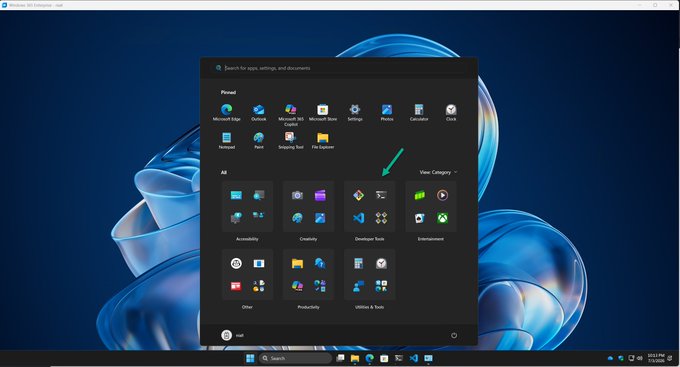
Visit: First looks at Windows 365’s gallery Image with Developer Configuration (preview)
Publish Microsoft Teams Windows 365 Cloud App using Intune
In this article, Vaishnav K explains how to publish the Microsoft Teams Windows 365 Cloud App using Intune. He walks through creating a provisioning policy, selecting a gallery image, configuring Windows settings, and assigning user groups and Cloud PC sizes. Vaishnav then shows how to publish Microsoft Teams from the Cloud Apps list and monitor its status as it moves to “Published.” Finally, he highlights the end‑user experience, where Microsoft Teams launches from the Windows App or browser and behaves like a locally installed application while running securely from a Cloud PC.
Visit: Publish Microsoft Teams Windows 365 Cloud App using Intune