
Welcome to the 215th edition of the Windows 365 Community newsletter! This week, we bring you the latest Windows 365 news, free events, and expert tips & tricks from the world of Cloud PC.
Autopilot device preparation for Cloud PC provisioning is now available
Microsoft has announced that Windows 365 now supports Autopilot device preparation with Cloud PC provisioning, enabling admins to define readiness criteria and ensure apps and scripts are installed before a Cloud PC is marked as provisioned.
Visit: What’s new in Windows 365 Enterprise and Windows 365 Flex
Microsoft Dev Box — maintenance mode
Dev Box is now in maintenance mode, with no additional features planned. Microsoft’s investments for developer cloud environments are focused on Windows 365, which provides a unified, scalable solution for developer scenarios.
Visit: Microsoft Dev Box — maintenance mode
Free 50-Hour Windows 365 for Agents Trial Now Available with Microsoft Copilot Studio
In this blog post, Anoop C Nair announces a free 50‑hour Windows 365 trial for running AI‑driven Computer‑Using Agents (CUAs) on secure Cloud PCs. These agents operate through the UI like a human and offer more flexibility than traditional RPA. He also outlines the three phases of AI‑agent adoption that lead toward human‑led, agent‑operated organizations.
Visit: Free 50-Hour Windows 365 for Agents Trial Now Available with Microsoft Copilot Studio
How to Set Time Limit for Active But Idle Remote Desktop Services Sessions on Windows 365 Flex with Intune
In this blog post, Vaishnav K explains how to configure a time limit for active but idle Remote Desktop Services sessions on Windows 365 Flex using Microsoft Intune. He covers the default behavior, supported Windows versions, and how administrators can enforce automatic disconnection after a chosen idle period. It also walks through creating and assigning the Intune configuration profile and verifying successful policy deployment through event logs.
Azure Virtual Desktop Hybrid Explained
In this blog post, Dieter Kempeneers explains Microsoft’s new Azure Virtual Desktop Hybrid option, which allows organizations to run AVD session hosts on‑premises using Azure Arc–enabled servers while still relying on Microsoft’s cloud‑managed control plane. He highlights the benefits for data sovereignty, reduced frontend management, and scenarios where latency‑sensitive applications must remain local. He also compares AVD Hybrid with Windows 365, cloud‑native AVD, and traditional VDI, and outlines current limitations such as the lack of Windows 11 multisession support.
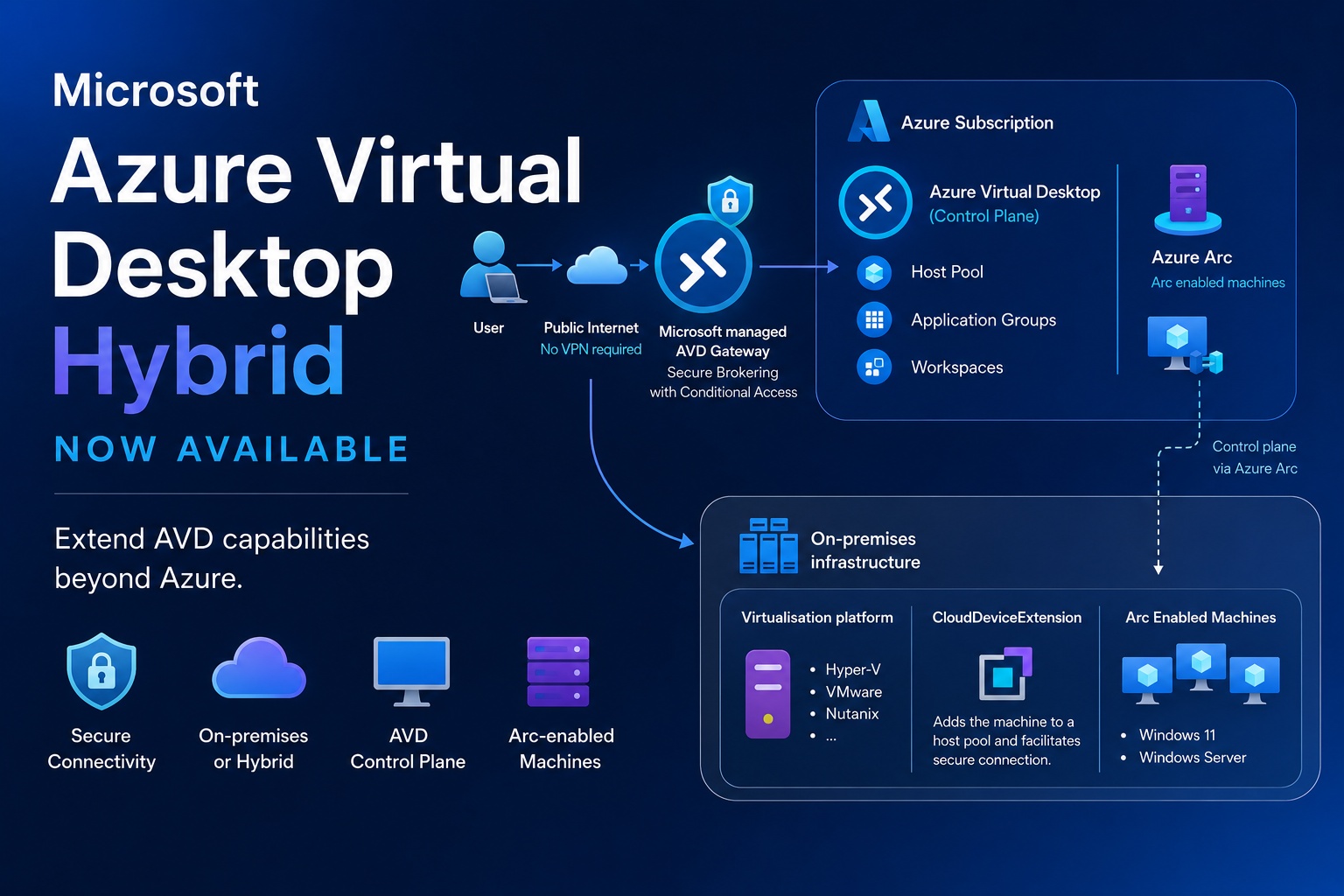
Visit: Azure Virtual Desktop Hybrid Explained
Securing the DaaS environment: protecting the management platform
In this blog post, Dominiek Verham outlines practical ways to protect the management platform in a DaaS environment following a real‑world incident where attackers used a compromised account to wipe devices. He walks through key Intune‑based safeguards—scope tags to limit admin visibility, Multi‑Admin Approval to prevent destructive actions, the Clean Source Principle to avoid trust‑chain weaknesses, and the design of Privileged Access Workstations (PAWs) for secure administration. He also highlights the importance of well‑managed break‑glass accounts to maintain access during emergencies.

Visit: Securing the DaaS environment: protecting the management platform
Windows365/Cloud PC provisioning
In this video, Mahammad Kubaib explains how to provision a Windows 365 Cloud PC using Microsoft Entra Join and a Microsoft‑hosted network. he shows how to create a provisioning policy, choose the Cloud PC experience, configure join type, pick a region, enable Entra SSO, choose an image, and assign the policy to a user group.